5 phút đọc
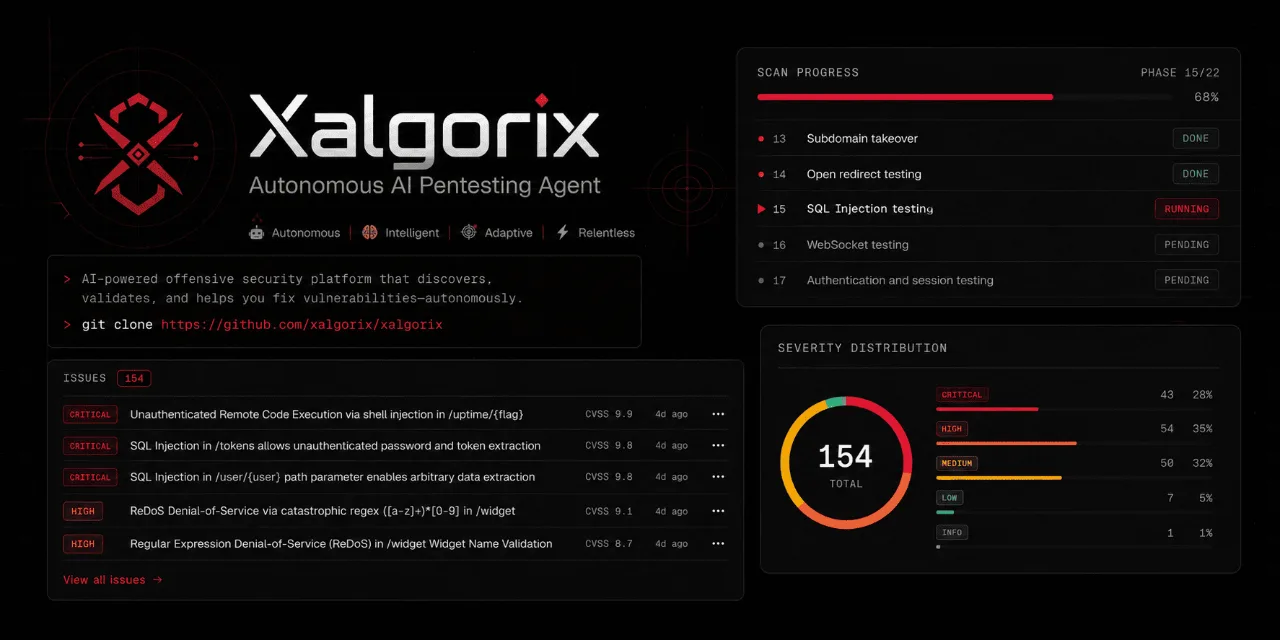
xalgorix/xalgorix: Autonomous AI pentesting agents — real-time reconnaissance, vulnerability detection, and e – Repository xalgorix/xalgorix. Mô tả: Autonomous AI pentesting agents — real-time reconnaissance, vulnerability detection, and exploitation orchestration. Go + TypeScript.. 930 stars, 166 forks, ngôn ngữ chính Go, cập nhật 2026-08-27.
1. Repository làm gì?
Most scanners detect. Xalgorix proves. An autonomous LLM agent works a full pentest methodology, then an independent verifier re-exploits every finding before it's reported — so you get proof, not a pile of maybes to triage. Self-hosted, private, and bring-your-own-LLM. Built in Go + TypeScript.
🚀 Quick Start · 💡 Why Xalgorix · ✨ Features · 🎯 Use Cases · ☁️ Hosted Cloud · 📖 Docs
🖥️ Self-hosted dashboard — runs locally on 127.0.0.1:9137
☁️ Hosted cloud dashboard — the fully managed version at www.xalgorix.com
This downloads the prebuilt binary for your platform (Linux amd64/arm64) from the latest release. Then run the interactive setup wizard:
Choose your provider, confirm a model, and enter the API key when prompted. For best results, use a current frontier model with strong reasoning, long-context performance, and reliable tool calling—such as the latest capable GPT, Claude, or Gemini model available to you. Smaller or local models remain supported, but may require more supervision during long autonomous scans. Xalgorix stores the key privately in ~/.xalgorix.env (mode 0600) and can launch the dashboard for you. Local Ollama needs no API key.
2. Dữ liệu và cấu trúc đáng chú ý
If you choose not to launch immediately, start later with xalgorix –web and open http://127.0.0.1:9137. You can change providers or advanced options at any time under Settings → LLM, or rerun xalgorix –setup.
Or run with Docker — batteries included, no toolchain needed:
–privileged gives the toolset the same host-like access it has when run natively as root. Docker's default sandbox drops capabilities (like NET_ADMIN) and applies a seccomp filter, which breaks low-level tools (iptables/route changes, ARP-spoof/MITM, tun/tap VPNs, ptrace-based debuggers, masscan interface tuning). Since an image can't grant itself these, they must be set at run time. The container is a disposable, network-isolated scanning sandbox running as root — privileged is the intended posture; never expose the dashboard publicly without auth. Prefer least-privilege? Swap –privileged for –cap-add=NET_ADMIN –cap-add=NET_RAW –cap-add=SYS_PTRACE –security-opt seccomp=unconfined.
Open http://localhost:9137. You don't need an LLM key to start — the dashboard launches without one; set the model + API key under Settings → LLM (it persists to the /data volume). If you don't pass XALGORIX_USERNAME/XALGORIX_PASSWORD, a random admin password is generated and printed to the container logs on first run.
Easiest — Docker Compose (maps the port + a persistent volume for you):
The image ships an extensive offensive-security toolset preinstalled (nmap, nuclei, httpx, subfinder, katana, ffuf, gobuster, sqlmap, masscan, dalfox, feroxbuster, and more) and keeps every package manager (apt, go, cargo, pipx, npm) available so the agent can still auto-install anything missing at runtime. It runs as root inside the container by design — treat the container as a disposable, network-isolated scanning sandbox and never expose the dashboard without auth. (amd64 image; the installer above covers arm64.)
Or build from source (needs Go 1.25+ and Node.js):
3. Khả năng ứng dụng và giới hạn
Prefer zero setup? A fully managed version runs at www.xalgorix.com — click-to-scan, no install or API keys required.
🤖 Review pull requests automatically — free GitHub App
Want a security review on every pull request with zero setup? Install the Xalgorix GitHub App. It reads each PR's diff and comments a security review — injection, broken auth/IDOR, SSRF, secrets, unsafe patterns — right on the pull request. Updates in place on new commits, and you can comment @xalgorix review to re-run on demand. No workflow file, no API key, no account — and it's free.
For merge gating and full exploit-verified pentests in CI, use the hosted scanner or the GitHub Action.
Use Xalgorix only on systems you own or have explicit permission to test.
Prefer not to self-host? A fully managed version is available at www.xalgorix.com — click-to-scan, no install or API keys required.
Xalgorix is a self-hosted AI penetration testing platform for authorized security testing, vulnerability assessment, and bug bounty workflows. It combines an LLM-driven autonomous agent, browser automation, terminal tooling, a comprehensive 22-phase testing methodology, live WebSocket telemetry, finding management with CVSS scoring, branded PDF report generation, and integrations for AgentMail, Discord, and Telegram.
Unlike cloud-only DAST scanners, Xalgorix runs entirely on your machine. You bring your own LLM provider (OpenAI, Anthropic, DeepSeek, Gemini, Groq, Ollama, MiniMax) and control the model, reasoning effort, rate limits, and proxy configuration. No scan data, API keys, or target information leaves your infrastructure.
The default experience is the Web UI. From one local dashboard you can start scans, monitor active runs, inspect findings, configure model/provider settings, manage environment variables, generate branded PDF reports, and delete or resume historical scans.
Số liệu repository có thể thay đổi; nên mở liên kết nguồn để kiểm tra README, giấy phép và trạng thái phát hành.
Nguồn tham khảo: Xem bài gốc