
4 phút đọc
Nongfsq/ftop: A small, quiet system monitor for Apple Silicon Macs: one floating glass panel that works – Repository Nongfsq/ftop. Mô tả: A small, quiet system monitor for Apple Silicon Macs: one floating glass panel that works at any size.. 430 stars, 27 forks, ngôn ngữ chính Swift, cập nhật 2026-11-11.
1. Repository làm gì?
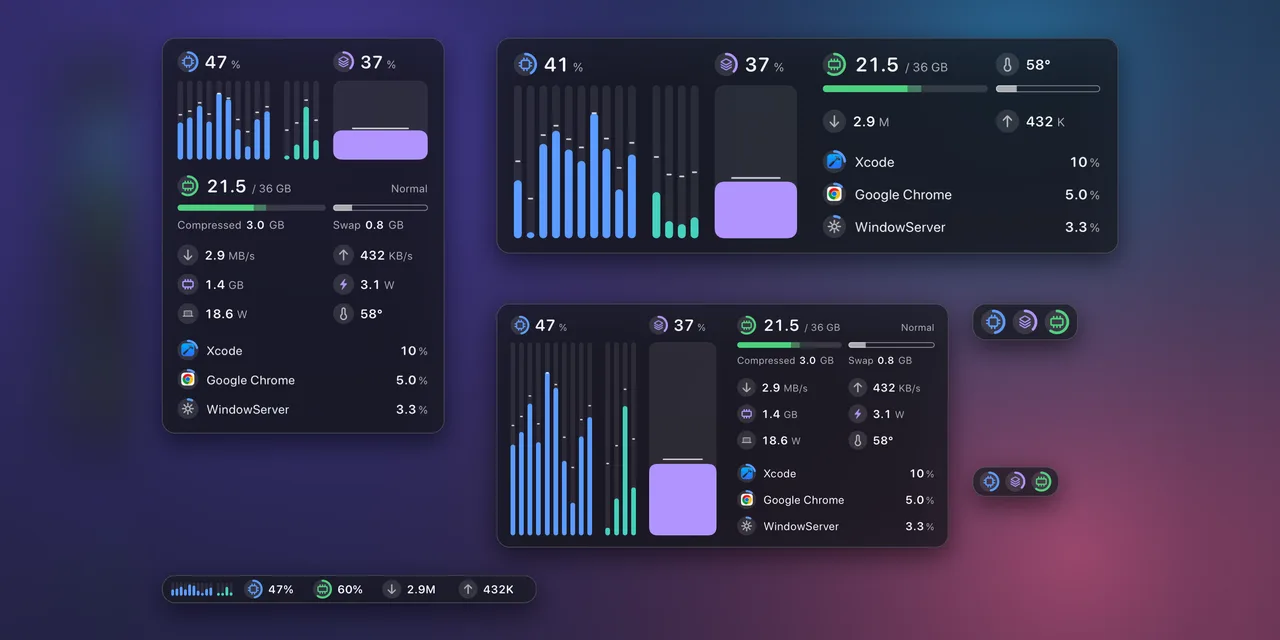
A small, quiet system monitor for Apple Silicon Macs.One floating glass panel that works at any size.
ftop replaces the terminal monitor you keep open in a spare tab with a native window you can leave anywhere on the desktop. It is for the moments when the machine is working hard — a local model running, an agent compiling, a long build — and you want to see at a glance what the cores, memory, and network are doing, and which app is responsible.
It shows the current state only: no history graphs, no disk panels.
Drag any edge or corner; the pointer turns into the resize cursor as soon as it is near one. ftop picks the layout that fits and the window settles onto it, so nothing is ever clipped and no space is left empty. A small window keeps the essentials; a large one shows more, not bigger type.
Every figure is led by the same small round badge, and a badge with an arc is a gauge. The color says what it belongs to; there is almost no text to read.
A reading the hardware does not give is shown as unavailable, never as zero.
2. Dữ liệu và cấu trúc đáng chú ý
With Reduce Motion on in macOS, all of this becomes plain fades.
The menu bar shows CPU by default, as a glyph and its number. Up to three readings can sit there side by side: CPU, memory, swap, GPU, download, upload, or power. Click it to show or hide the panel.
Right-click the panel or the menu bar item. One block holds everything: what to show, how the panel behaves, the colors, and under More the few settings that have a value.
Right-click a process row and the block starts with that process: End asks it to quit (an app can still ask to save), Force End stops it at once. Both ask first. ftop ends only your own processes, never itself or the system's.
The same settings are a plain text file, ~/.config/ftop/config.json5 (JSON with comments). The two stay in step, and a saved change applies at once.
Measured with scripts/perf.sh on a 14-core Apple Silicon Mac, updating once a second:
With system processes granted (below), the helper that lists them adds about 0.5%.
3. Khả năng ứng dụng và giới hạn
Requirements: an Apple Silicon Mac with macOS 15 or later.
This puts Ftop.app in /Applications and links ftop onto your PATH. The app keeps itself up to date, so brew upgrade skips it unless you add –greedy.
From a release. On the releases page, download either file:
Then link the command into a directory on your PATH, using the folder you chose:
For a copy in ~/Applications, write ~/Applications/Ftop.app instead. Keep one copy; updates replace the app where it is.
From 0.2.6 the app is signed with a Developer ID and notarized by Apple, so it opens like any downloaded app.
From source. Needs Xcode (built and tested with Xcode 27).
This puts Ftop.app in ~/Applications and links ftop into ~/.local/bin.
On 0.1.0? That version cannot update itself. Install the latest release by hand once, as above; from 0.1.1 on ftop keeps itself up to date.
Số liệu repository có thể thay đổi; nên mở liên kết nguồn để kiểm tra README, giấy phép và trạng thái phát hành.
Nguồn tham khảo: Xem bài gốc